A recent case from our practice is a great example of how attackers combine legitimate tools for sustained remote access.
After gaining elevated privileges on the host, attackers installed Velociraptor, specifying their C2 server in server_urls. From this point on, further system management was carried out through it.
After basic Discovery, they downloaded Visual Studio Code (Insiders) and installed VS Code Tunnel in Install as a service mode. It’s essential to understand that under the hood, this is not a “real service” but a registry entry in the Run key:
HKU\.DEFAULT\Software\Microsoft\Windows\CurrentVersion\Run
Next, they performed a bit more of Discovery, but this time through the VS Code Server, and the next step was the appearance of Cloudflare Tunnel.
However, this was not enough for the attackers: the final touch was Zoho Assist in Unattended Remote Session mode, allowing them to connect to the system without any user confirmation.
The result: four independent remote access channels to a single host! Moreover, three of them - Velociraptor, VS Code Tunnel/Server, and Zoho Assist - are not very common.
What can be detected here?
— Velociraptor. If you’re not using it, any appearance of this service will be a red flag. And if you are using it, monitor the list of allowed servers, as requests to external server_urls look extremely suspicious.
— VS Code Tunnel. Pay attention to the service installation; the commands will be approximately like this:
    code-insiders.exe tunnel --accept-server-license-terms service install
    code-tunnel.exe tunnel service uninstall
Also, look at the Run key:
    key: Visual Studio Code - Insiders Tunnel
    value: ...\code-insiders.exe --verbose --cli-data-dir C:\Windows\system32\config\systemprofile\.vscode-insiders\cli tunnel service internal-run --log-to-file C:\Windows\system32\config\systemprofile\.vscode-insiders\cli\tunnel-service.log
And pay attention to the activity from VS Code Server processes located at .vscode\cli\servers\ or .vscode-insiders\cli\servers\.
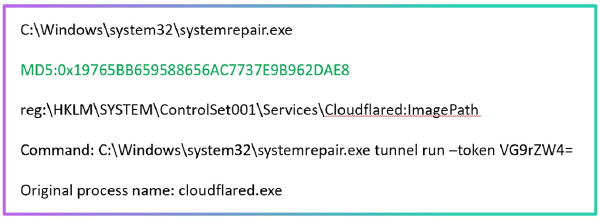
— Cloudflare Tunnel. When the service starts/stops and the tunnel is launched, an EventID: 1 is generated in the Application log (Source: Cloudflared) - this is a convenient point for alerts.
— Zoho Assist. To use it in Unattended mode, the Zoho Assist – Unattended Support service needs to be launched, implemented in the file ...\ZohoMeeting\UnAttended\ZohoMeeting\ZohoURSService.exe.