To make malicious files invisible to protection systems, attackers use various techniques. The most well-known ones are rootkits and bootkits. However, sometimes simpler mechanisms are sufficient. Recently, we came across a technique for hiding processes in Linux using bind mount over /proc.
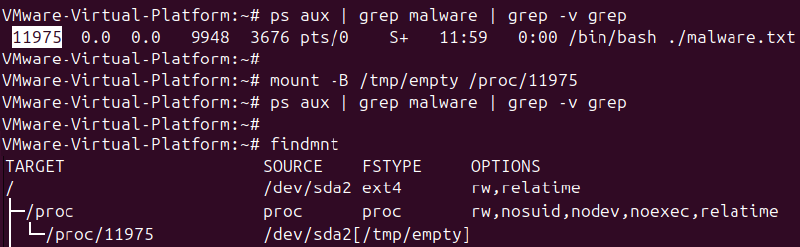
When the mount utility for mounting file systems is run with the bind flag, it allows “attaching” one directory or file to another point in the file system. As a result, the original data in the target point becomes invisible; in fact, it is overlaid with the contents of the mounted path.
An attacker with root access can use this to mask processes. For example, a process with PID 1234 can be hidden through mount:
mount --bind /tmp/empty /proc/1234After this, the contents of the actual /proc/1234 are overlaid with an empty directory. Utilities like ps, top, or htop read data directly from /proc, so for them, the process seems to disappear. At the same time, the process itself continues to run: it listens to ports, executes code, and maintains connections.
Sometimes, it’s done even more neatly: another file is mounted over /proc/<pid>/exe or /proc/<pid>/cmdline. Then, the process seems to be visible, but its binary or arguments are replaced.
How to detect the attack
Checking the mount table helps detect process hiding. The mount or findmnt utilities will show bind mounts inside /proc. In a normal system, there are almost no such mounts.
From the point of view of SOC detection rules, we track the launches of the mount utility with the corresponding arguments: “–bind”, “-B”, “-o bind”, and “/proc”.
It also makes sense to monitor the system call mount at the kernel level. For example, a simple audit rule for auditd might look like this:
auditctl -a always,exit -F arch=b64 -S mount -k mount_monitorAll mount events, including bind mounts, will be recorded in the /var/log/audit/audit.log file. When analyzing, it’s worth paying attention to operations where the mount point is a path inside /proc.