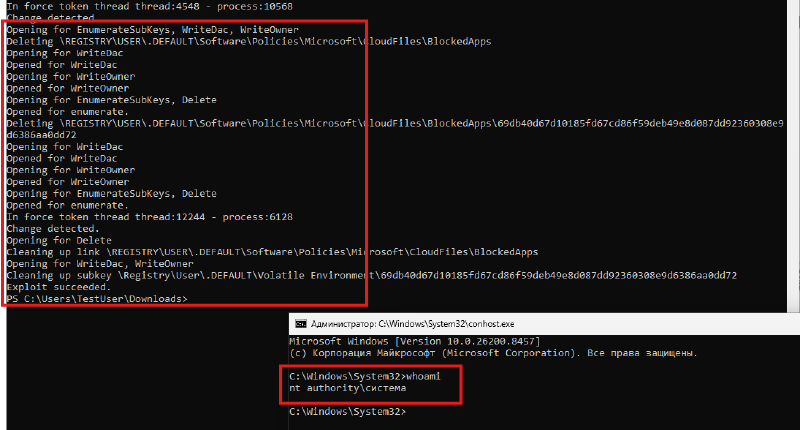
One of the main topics in recent security news is the confrontation between Microsoft and the anonymous researcher Nightmare Eclipse, who has published six serious exploits for Windows in just two months. The most unpleasant of them — MiniPlasma — has been used in real attacks since April, and there is still no official patch.
How it works:
The exploit is based on CVE-2020-17103, a local privilege escalation vulnerability in the Windows Cloud Files Mini Filter Driver cldflt.sys. The vulnerability was discovered back in 2020 and was considered patched. However, Nightmare Eclipse showed that it was still exploitable, allowing a local user to elevate privileges to SYSTEM.
cldflt.sys is a system driver that implements the Cloud Files API (CFAPI) and is used for working with placeholder files and synchronization mechanisms, including OneDrive Files On-Demand.
To interact with the driver, the exploit uses an undocumented API CfAbortHydration, intended to interrupt cloud file verification. This API, in turn, calls the internal driver function cldflt!HsmOsBlockPlaceholderAccess, which, according to its logic, should block access to the cloud file by creating a corresponding service key in the registry.
The function HsmOsBlockPlaceholderAccess is executed in the context of the privileged driver, but it does not check if the calling process has the permission to write to the target registry branch. As a result, the exploit gains the ability to create an arbitrary registry key in the system area HKEY_USERS\.DEFAULT, which a regular user does not have write access to.
Instead of a regular key, MiniPlasma creates a registry symbolic link in the branch HKU\.DEFAULT\Software\Policies\Microsoft\CloudFiles\BlockedApps. This link redirects to another area of the registry — \Registry\User\.DEFAULT\Volatile Environment, which contains temporary environment variables for the system profile.
Through the created symbolic link, the exploit changes the value of the windir variable in Volatile Environment from C:\Windows to a path controlled by the attacker, for example, C:\Users\Public\FakeSystem (current directory + system32\wermgr.exe). A fake executable file wermgr.exe is placed in advance in the directory specified by the attacker.
Next, the exploit contacts the Windows Task Scheduler and activates the built-in task \Microsoft\Windows\Windows Error Reporting\QueueReporting. This task is configured to run with SYSTEM privileges and, by default, executes the command %windir%\system32\wermgr.exe.
Thanks to the changed windir variable, the system uses the path controlled by the attacker, and instead of the legitimate system file, the fake wermgr.exe is launched — but now with NT AUTHORITY\SYSTEM privileges (see the screenshot above).
How to detect the attack:
- Monitor the creation of SymbolLinks in the branch
HKU\.DEFAULT\Software\Policies\Microsoft\CloudFiles\BlockedApps:
category: registry_set
    product: windows
detection:
    selection:
        TargetObject|contains: 'Policies\Microsoft\CloudFiles\BlockedApps'
        Details: 'SymbolicLinkValue'
condition: selection- Monitor the appearance of
wermgr.exeoutside standard paths:
category: process_creation
    product: windows
detection:
    selection:
        TargetFilename|endswith: '\wermgr.exe'
    filter_system_locations:
        TargetFilename|startswith:
            - 'C:\Windows\System32\'
            - 'C:\Windows\SysWOW64\'
            - 'C:\Windows\WinSxS\'
            - 'C:\Windows\servicing\'
            - 'C:\$WINDOWS.~BT\'
            - 'C:\Windows\SoftwareDistribution\'
    condition: selection and not filter_system_locations
Monitor the launch of system binaries or their imitations from non-standard directories.
The PoC uses James Forshaw’s .NET NtApiDotNet library for working with registry Native API, this is also an indicator of the attack.