While handling an incident at our client’s infrastructure, our MDR team discovered the ScreenConnect remote access tool being leveraged to deploy and execute an AsyncRAT payload.
A deeper investigation unraveled a massive campaign distributing malicious installer archives hosted on spoofed websites. These installers masquerade as popular software like OBS Studio, DNS Jumper, DS4Windows, Bandicam, Glary Utilities, Process Hacker, Crosshair X, and others.
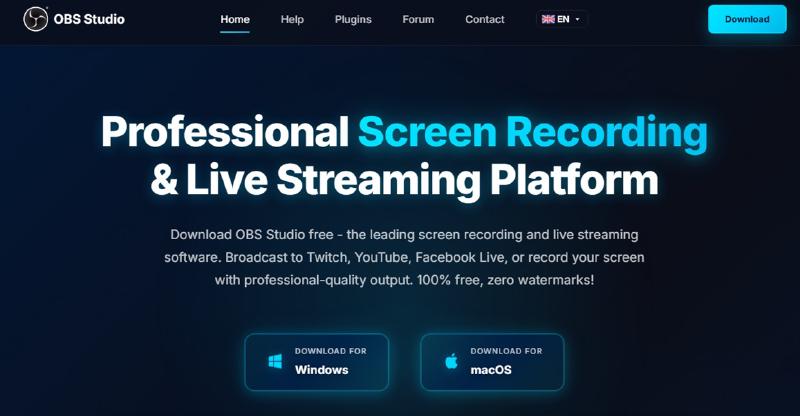
In total, we uncovered more than 90 fake sites localized across 10 languages. See an example in the screenshot above: it’s a typosquatted domain mimicking the official site for OBS Studio, a popular open-source screen recording app. In this specific incident, the user landed on the malicious domain directly from a search query: the threat actor is actively leveraging SEO techniques to boost traffic to fake landing pages.
The malicious archives bundle a legitimate, signed Microsoft install.exe binary alongside a rogue install.res.1033.dll library. It is loaded onto the device via DLL sideloading and stealthily deploys the ScreenConnect service, which awaits further instructions from the threat actors. In many corporate networks, remote access tools like ScreenConnect are frequently allowlisted and granted elevated privileges which greatly helps the attackers.
How to catch the attack:
- Monitor the creation of the ScreenConnect service with suspicious parameters:
logsource:
    product: windows
    category: security
detection:
    selection_access:
        EventID: 4697
        Service File Name|contains:
            - 'e=Access'
            - 'ClientService.exe'
    selection_support:
        EventID: 4697
        Service File Name|contains:
            - 'e=Support'
            - 'ClientService.exe'
condition: selection_access or selection_support- Watch for anomalous child processes being spawned by the ScreenConnect service:
logsource:
    product: windows
    category: process_creation
detection:
    selection:
        ParentImage|endswith:
            - '\\ScreenConnect.ClientService.exe'
            - '\\ScreenConnect.WindowsClient.exe'
            - '\\ScreenConnect.WindowsBackstageShell.exe'
            - '\\ScreenConnect.WindowsFileManager.exe'
        Image|endswith:
            - '\\powershell.exe'
            - '\\cmd.exe'
            - '\\net.exe'
            - '\\schtasks.exe'
            - '\\sc.exe'
            - '\\msiexec.exe'
            - '\\mshta.exe'
            - '\\rundll32.exe'
    condition: selection
As general preventive measures, we recommend you to enforce strict software installation controls, monitor for the creation of new remote administration services and scheduler tasks, verify the authenticity of all software sources and regularly train users on safe downloading practices.
For more details on the investigation of this large-scale attack, IoCs and additional tips for detection, see Denis Kulik’s article “ScreenConnect masked as freeware: An inside look at a large-scale campaign”.